Samyak Matrimony is India's leading Buddhist matrimony platform, established in 2001, exclusively serving the Marathi Buddhist (Navayana / Ambedkarite) community. With over 50,000 registered profiles and 1,500+ successful marriages, we help Buddhist families find verified life partners across Maharashtra and India.
Samyak Matrimony is open to all Buddhist community members — especially Marathi Buddhists, Navayana Buddhists, and Ambedkarite Buddhists — across Maharashtra, India and abroad. Both brides (vadhu) and grooms (var) can register freely.
Registration is simple and 100% free: 1. Click Register Free 2. Enter basic details (name, DOB, gender, mobile) 3. Complete your profile (religion, education, family) 4. Upload your photo 5. Your profile goes live immediately!
Your profile goes live instantly after registration. Profiles with photos and complete details rank higher in searches. Photo ID Verification takes 1–2 business days.
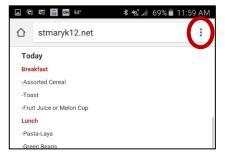
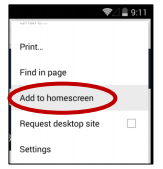
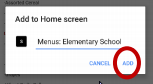
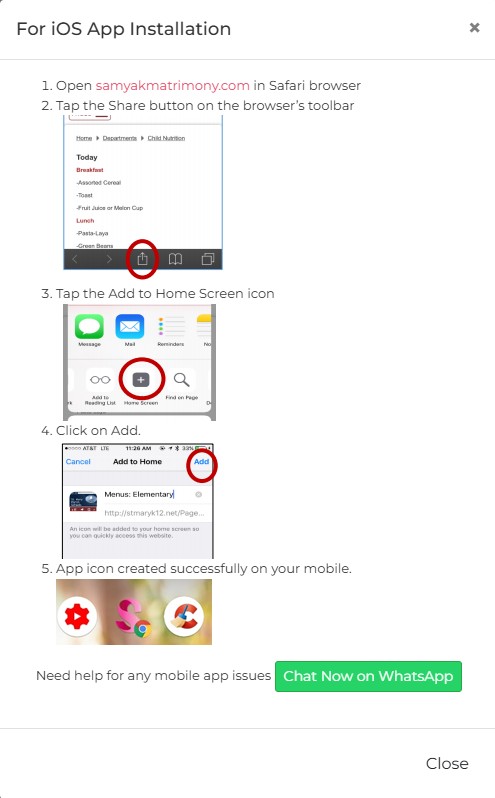
Yes! Available on Android (Google Play Store) and iOS (Apple App Store). Search 'Samyak Matrimony' to download. The app includes all website features plus push notifications.
Membership & Plans 5 Q
Basic registration is completely free. You can create your profile, upload photos, browse matches, and send express interest at no cost. Paid plans unlock contact viewing, unlimited messaging, and premium features.
We offer multiple plans: Classic — Starter plan with basic contact views Silver — Mid-range with contacts + messaging + chat Gold — Popular plan with higher limits Premium — Extended validity + priority support Elite — Maximum features for serious seekers View all plans & pricing →
Log in → Current Plan → Choose plan → Pay via UPI, Net Banking, Credit/Debit Card, or Wallet. Activation is instant.
Your profile stays visible but premium features (contact viewing, messaging) are paused until you renew. Renew anytime from your dashboard.
Yes. The remaining value of your current plan is adjusted against the new plan cost when you upgrade.
Searching Profiles 5 Q
Use Advanced Search to filter by: Age, City/District/State, Religion & Caste, Education, Occupation, Marital status, Height, Mother tongue, and Income. You can also search directly by Profile ID.
Yes — search profiles from any city (Mumbai, Pune, Nagpur, Nashik, Aurangabad, Thane, Delhi, Bangalore, etc.), district, or state. Use Location filters in Advanced Search.
My Matches auto-shows profiles matching your partner preferences. Set your ideal partner criteria in Partner Preferences and the system refreshes matches in real-time.
Click the Bookmark button on any profile. View all bookmarked profiles under My Profile → Bookmark Profiles.
Yes — filter by education level (Bachelors, Masters, PhD), education field (Engineering, Medicine, Commerce), and occupation (Government, Business, IT, etc.).
Contacting Matches 4 Q
You need a paid plan with contact balance. Go to their profile → Click View Contact. Each view uses one contact credit from your plan.
Contact balance = number of member phone numbers you can view under your plan. E.g., a Gold plan with 100 contacts lets you view 100 numbers during the plan period.
Free members can send Express Interest. Sending full inbox messages requires a paid plan with message balance.
Live Chat is real-time messaging. Available on Silver, Gold, Premium, Elite plans. Both members must be online simultaneously.
Profile Verification 4 Q
Submit a government photo ID (Aadhaar, PAN, or Passport) via WhatsApp to +91 98198 86759. Our team verifies within 1–2 business days and adds a Verified ✓ badge.
The Photo ID Verified ✓ badge confirms the member passed identity verification. Verified profiles get higher search visibility and more responses from families.
No, it's optional but strongly recommended. Verified profiles receive significantly more interest from serious alliances.
Our moderation team reviews profiles, photos, and reports. Fake profiles are removed within 24 hours of detection. Report suspicious profiles using the Report button.
Privacy & Safety 5 Q
No. Your number is hidden by default and only visible to paid members who use a contact credit. Restrict further in Settings → Privacy.
Yes. Go to their profile → Click Block. Blocked members cannot view your profile or contact you.
By default, all logged-in members. Set photos to Private in Photo Settings — only members you approve can see them.
Click the Report button on the profile page. Our team reviews all reports within 24 hours and removes confirmed fakes.
Never. Samyak Matrimony does not sell or share your personal data with any third party. Read our full Privacy Policy.
Express Interest 4 Q
Express Interest is a free way to show interest in someone's profile — like a 'like'. The recipient gets notified and can Accept, Reject, or ignore.
Once accepted, you can exchange contact details (paid plan needed) or send a message to move the alliance forward.
Yes — send interest to as many profiles as you like with no daily limits.
Go to My Profile → Interests Received or click here to see Pending, Accepted, and Rejected interests.
Messaging 3 Q
Go to any profile → Click Send Message. Requires a paid plan with message balance.
Message balance = number of inbox messages you can send under your plan. Renew or upgrade to get more.
Yes! Use Support Chat (after login) to message our support team directly. We reply within a few hours.
Payment & Refund 4 Q
UPI (GPay, PhonePe, Paytm), Net Banking, Credit/Debit Cards, and popular wallets. All payments use SSL-encrypted secure gateways.
Yes — 256-bit SSL encryption. We do not store card details. Payments via RBI-compliant gateways.
Contact us within 7 days of payment for technical issues at info@samyakmatrimony.com with your transaction ID. Refunds processed in 7–10 business days. See Refund Policy.
Membership fees are non-refundable once activated. Contact support for special cases — reviewed individually.
Account Settings 5 Q
Log in → Edit Profile. Update personal details, education, career, family, partner preferences, and description anytime.